
Friends, the insta trending cricket stadium video trend and Korean baseball AI video trend are currently dominating social media. People are transforming their own photos into stunning cinematic videos, and these eye-catching edits are inspiring thousands of others to create similar content.
This viral AI video trend is attracting massive attention on platforms like Instagram, Facebook, and YouTube. From the electrifying atmosphere of an IPL cricket stadium to the stylish look of Korean baseball scenes, these videos turn ordinary selfies into professional-looking clips that feel straight out of a movie. The popularity of the insta trending cricket stadium video format is motivating more creators to experiment with AI tools and produce their own personalized videos.
In this article, you will learn how to create this type of AI video in just two minutes. I will guide you through every step, from writing the perfect prompt to generating the final video. If you also want to make a viral insta trending cricket stadium video using ChatGPT and Google Flow, then you are in the right place. Follow the complete tutorial below and start creating your own trending AI video today.
Create Your IPL Cricket Stadium Photo by Using Chatgpt
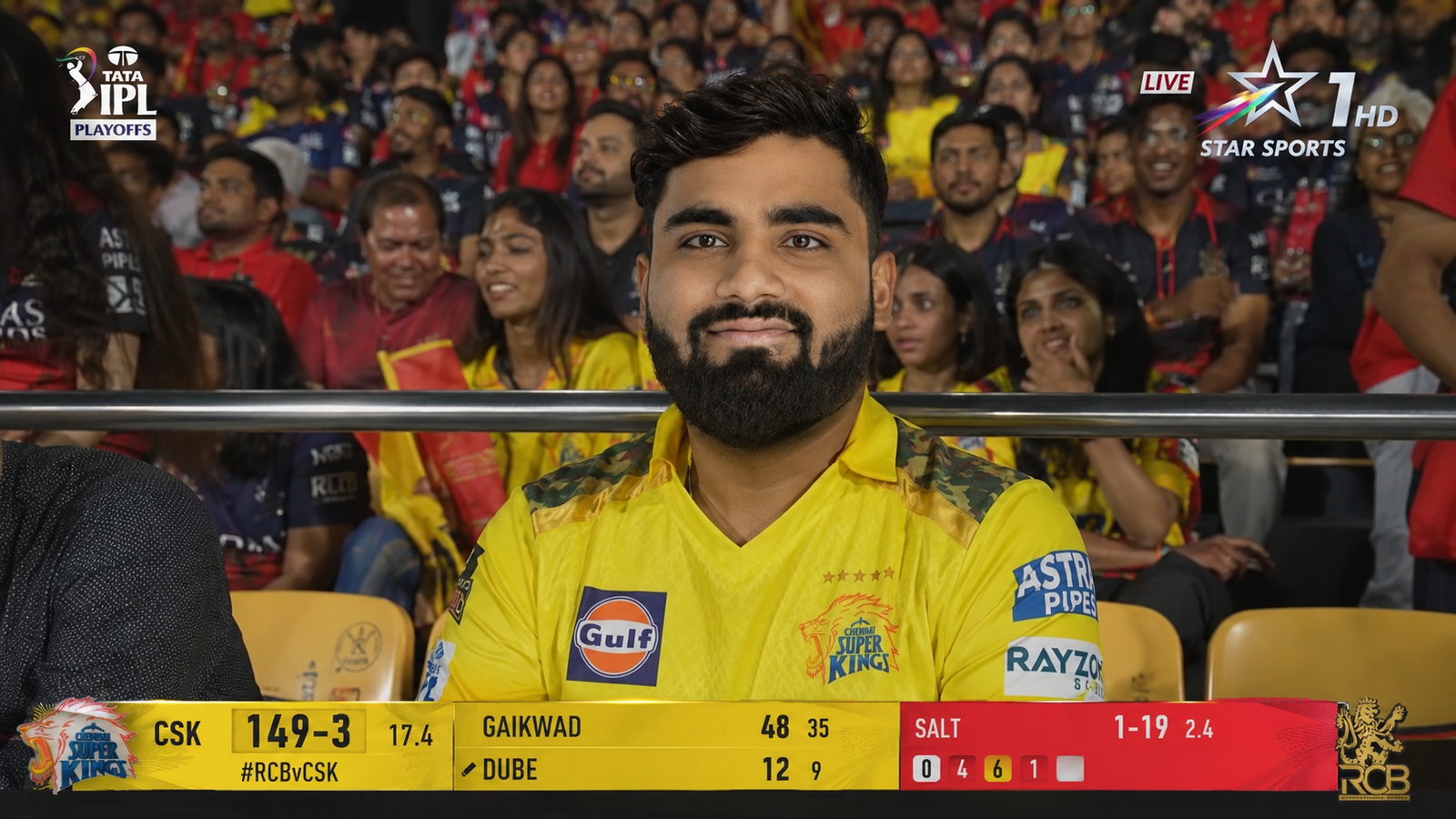
Copy this prompt and paste to chatgpt with your image.
A screenshot from a live IPL cricket TV broadcast on Star Sports. The camera cuts to the audience our reference image person sitting in the crowd, smiling naturally and unaware they're on camera. The subject and is wearing csk jersey, is seated in premium stadium seats near the boundary rope during a high-energy match between Royal Challengers Bengaluru (RCB) and Chennai Super Kings (CSK). Hardlock: Do not alter their facial structure, skin texture, or likeness in any way.The stadium atmosphere is electric packed crowd, vibrant red and yellow team colors throughout the stands, dramatic stadium floodlights, flags waving, blurred motion from cheering fans in the background. Full authentic cricket broadcast overlay visible: IPL-style scorecard graphics, Star Sports logo watermark, over count, team scores, player stats ticker, match status.The game is IPL playoffs - Qualifier match atmosphere. CSK currently leading the series momentum after dominating previous matches against RCB.The image should look exactly like a real TV broadcast screenshot - realistic sports broadcast cinematography, live camera framing, authentic sports color grading, slight compression artifacts, interlacing grain, subtle motion blur, realistic depth of field from a broadcast zoom lens, candid audience capture aesthetic.16:9 aspect ratio, ultra-realistic live sports broadcast feel, indistinguishable from an actual televised IPL match screenshot.
After pasting the prompt, click on the Generate button and wait for a few moments while the AI processes your image. Within minutes, your stunning IPL cricket stadium AI image will be ready with a realistic and cinematic look. You can download the image and use it to create a viral insta trending cricket stadium video. The best part is that you can also generate similar images using photos of your friends, family members, or loved ones. This makes it a fun and creative way to turn ordinary pictures into professional-looking stadium scenes.
How to generate IPL cricket stadium AI video with image
After generating AI images with the ChatGPT app, the next step is creating AI videos, a format that is currently trending across many social media platforms. The process is straightforward and beginner-friendly. Start by opening Google or any web browser on your smartphone and search for Flow AI. Visit the official website, then sign up for a new account or log in with your existing credentials.
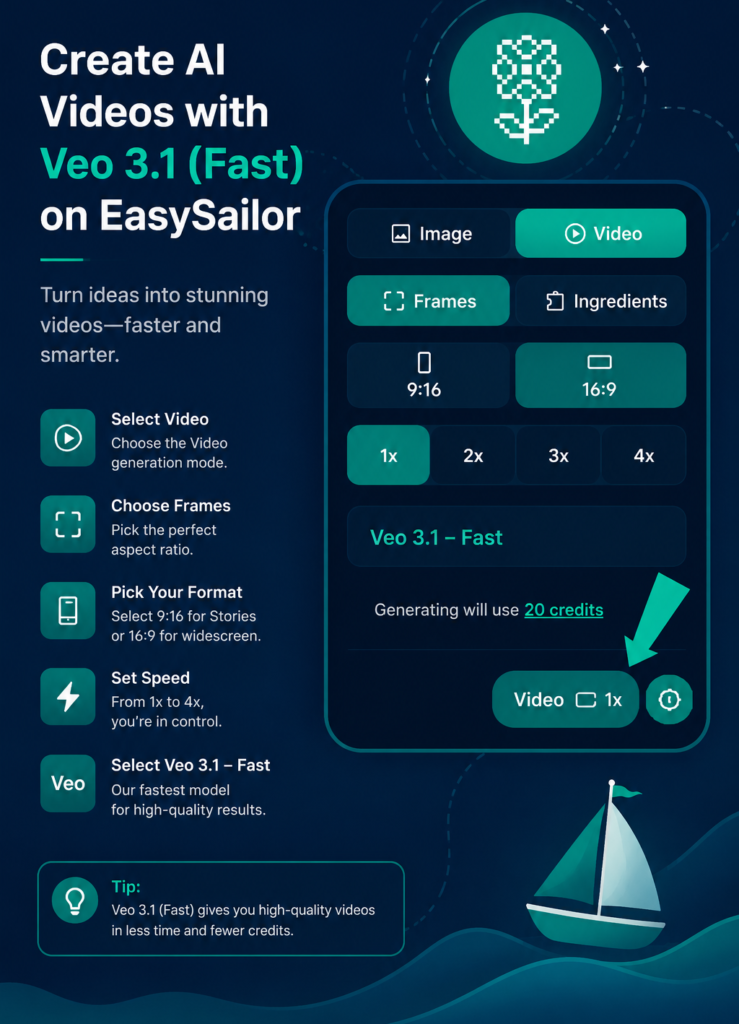
Once you are logged in, click on Create Project and choose the Video option. Configure the initial settings by selecting the number of frames, setting the aspect ratio to 16:9, and choosing 1x mode.
To better understand the setup, refer to the image shown below. After completing the settings, click on Start, upload the image you created in ChatGPT, and paste the video prompt provided below. You can simply copy the prompt and use it directly.
Use this prompt
The shot feels exactly like a genuine TV crowd cutaway during a tense moment of the game when the broadcast camera finds a notable guest in the audience. The subject from the reference image is seated in the crowd wearing the same t-shirt, same hairstyle, same facial features, same lighting, and same stadium environment from the original image. Preserve identity strongly and maintain facial consistency throughout the full sequence. This is a real live sports-broadcast style shot - not cinematic film style. The subject is smiling casually and naturally, reacting to the match atmosphere. she is not performing for the camera and is not constantly making eye contact with the lens. Her behavior should feel completely authentic, like a real crowd reaction captured during a live game. One continuous take. No cuts. No camera angle changes. Action Timeline 0 to 2 seconds: The camera lands on her in the crowd naturally.She smiles casually while watching the game. She briefly glances toward the field, then toward the giant stadium screen/Jumbotron, then back toward the match. Background crowd movement feels alive and energetic. 2 to 4 seconds: She notices himself on the big screen and gives a relaxed natural wave toward the camera. Her eyes look at the camera.
Creating an insta trending cricket stadium video is now easier than ever with the help of ChatGPT and Google Flow. In just a few minutes, you can transform a simple selfie into a cinematic AI video that places you inside a packed IPL cricket stadium or a stylish Korean baseball scene. By following the prompts and step-by-step instructions shared in this guide, anyone can create professional-looking videos without any advanced editing skills.
Whether you want to make a viral reel for Instagram, impress your friends, or experiment with the latest AI trends, this method offers a quick and creative solution. You can also use photos of your family members and friends to generate unique and memorable videos. Start creating your own insta trending cricket stadium video today and join one of the most exciting AI video trends on social media.
Frequently Asked Questions (FAQs)
1. How can I create an insta trending cricket stadium video?
To create an insta trending cricket stadium video, first generate your AI image using ChatGPT, then upload it to Google Flow and use the provided video prompt. Within a few minutes, your cinematic cricket stadium video will be ready.
2. Is it free to create IPL cricket stadium AI videos?
Yes, you can create these AI videos for free using tools like ChatGPT and Google Flow. Some platforms may offer premium features, but the basic image and video generation process can be done without any cost.
3. Can I use my own photo for this AI video trend?
Absolutely. You can upload your own selfie or portrait photo to generate a personalized IPL cricket stadium image and convert it into a viral AI video.
4. Can I create cricket stadium videos with friends and family photos?
Yes, you can use photos of your friends, family members, or loved ones to create fun and realistic AI videos. This makes the trend even more enjoyable and shareable on social media.
5. How long does it take to generate the AI video?
The complete process usually takes around 2 to 5 minutes, depending on the speed of the platform and the complexity of the prompt.
6. Which social media platforms are best for sharing these videos?
These videos perform especially well on Instagram, Facebook, YouTube, and TikTok, where AI-generated cinematic content is currently trending.
RCB vs CSK match video prompt